


For the quarter ending June 30, 2026, here are some product release highlights.
New Products
Introducing Evinced Learn
In April, Evinced partnered with Knowbility to launch Evinced Learn, a free accessibility training platform that helps bridge the gap between accessibility theory and real-world implementation. With role-based tracks for fundamentals, UX designers, web developers, and mobile developers, Evinced Learn provides practical guidance for building more inclusive digital experiences.
Enterprise customers can integrate Learn into their own learning management systems using SCORM packages, while IAAP-certified professionals can earn continuing education credits toward certification renewal. Experienced accessibility practitioners can also test out of courses through pre-assessments and continue using the course materials as an on-demand resource.
New Features
Scan entire iOS apps with one click
App scanning capabilities are now available for iOS in Mobile Flow Analyzer. One click scans the entire app, identifying accessibility issues throughout the mobile application, not just individual screens, and it also creates an app navigation map that shows the relation between each screen in the application. Previously only available for Android, now iOS teams can automatically explore app flows, scan up to 1,000 screens in a single session, and uncover accessibility issues faster with improved performance. Launched June 2026
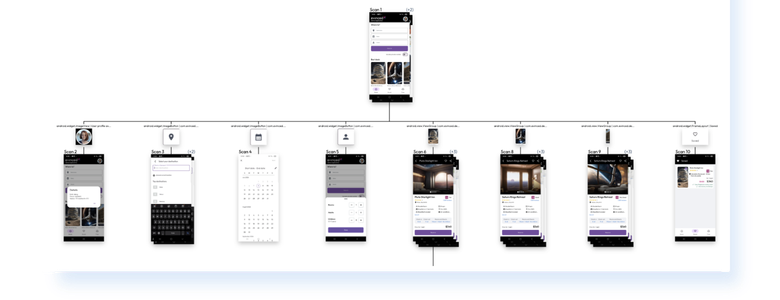
Image: iOS app navigation map from Mobile Flow Analyzer
Dark Mode now available across multiple products
Dark Mode is now available in Mobile Flow Analyzer and Web Flow Analyzer, providing an alternative viewing experience during testing.
The interface automatically matches the user’s system appearance settings and can also be customized manually to fit individual preferences and light sensitivity needs. Launched May 2026
Bring Site Scanner data wherever you need it
Site Scanner now includes a public REST API, allowing teams to automatically pull data for properties, scans, accessibility scores, and issues directly into their own systems. Teams can integrate Site Scanner data into dashboards and reporting workflows, reducing the need for manual exports and making accessibility reporting easier to scale. Launched June 2026
Even easier setup for Automation SDKs for Web
AI agent users can now take advantage of new built-in setup skills to integrate Automation SDKs for Web into existing test environments with even more ease.
The skills deliver guidance tailored to a developer’s existing test automation setup – from configuring the Evinced SDK and adding accessibility checks to existing tests to setting up rules and reporting. These new skills can make even the most complex test automation setups a breeze to integrate. Available for Cypress JS SDK, Playwright JS SDK, TestCafe JS SDK, WebdriverIO JS SDK, and Selenium JS SDK. Launched June 2026
Improvements
Session sharing in Mobile Flow Analyzer
We also introduced session sharing in Mobile Flow Analyzer, allowing teams to export and import complete Mobile Flow Analyzer sessions. Whether collaborating with accessibility specialists, handing work off to teammates, or continuing testing across distributed teams, session sharing makes it easier to review findings together. Launched April 2026
Test dialogs and their launchers with Unit Tester
Unit Tester now supports more comprehensive testing of dialog windows. Developers can test modal and non-modal dialogs that are already open, or test both the element that launches a dialog and the resulting dialog together. Launched April 2026
New Validations for Mobile
In Q2, we introduced new automated accessibility validations, while expanding coverage across our mobile testing solutions.
- Meaningful-headings is a new LLM-assisted validation that checks whether headings accurately describe the content that follows. This helps teams meet WCAG 2.4.6 and improve navigation for users of assistive technologies. Launched April 2026
- Ignored-by-assistive-technology is a new validation for iOS. It detects elements that are unintentionally hidden from screen readers and other assistive technologies, helping ensure important content remains accessible to users who rely on them. Launched June 2026
Additionally, screen-orientation-lock is now automatically validated across both iOS and Android without requiring Mobile Kit (launched June 2026). And visible-labels (for iOS) and keyboard-focusable (for Android) validations are now available in the Appium Python SDK, bringing existing accessibility checks to more automation workflows (both launched June 2026).
See where issues re-occur across Mobile Flow Analyzer and Automation SDK for Mobile
Both our Mobile products now report a tally of how many times and on which screens each particular issue appears. The idea is that the team can use this information as an aid for determining which issues to fix first. (Launched June 2026)
In brief
Web Flow Analyzer, and the Web Dashboard, now feature a redesigned filtering interface that makes it easier to find and review issues (launched in May 2026). Additionally, Web Flow Analyzer also offers new configurable screenshot capture methods that give users more flexibility when working with resource-intensive or complex websites, including sites with iframes (launched in May 2026).
For the full list of improvements and feature updates, please see our What’s New product update page (requires login).


