Published on September 4, 2026 Reading time: 9 min

How fixing an accessibility bug can cost $15,000

Post category: Accessibility
Decorate header for $15K bug blog post

What does it cost your organization to let an accessibility bug slip through to production? 

If you never intend to fix the bug, that cost is low. But if you do, the cost can be substantial.

How do we know? Because we asked. We sat with customers who care deeply about accessibility, and several of them were candid about exactly what they were spending to fix bugs found in production, sharing their numbers with us under NDA. We also asked our own team the same question about our own development process. 

The answers varied, of course. But what was consistent was how easily and commonly a bug found in production can cost at least $15,000 to fix. (You may remember this number from our post on false negatives.)

And while $15,000 might sound extreme, rest assured it all adds up once you trace where the costs actually come from. Let’s break it down.

The scenario

To be clear: one developer fixing a line of code in real time won’t come close to $15,000. But a bug found in a live production site – by an end user or an auditor, months after the build shipped – is a very different story. 

By that point, fixing it isn’t work for one person. It requires many team members, many steps, and a lot of coordination overhead.

As a first step in going through this, here’s a summary of the resources costs generated at each phase of remediation.

Exhibit 1. Resource Cost Summary, Remediation of Production Accessibility Bug

PhaseTasksResource Cost
TriageRead list, reproduce issues, prioritization meeting with team, etc.$3,775
DiagnosisRoot cause analysis, decide fix approach and teams involved, etc.$3,950
FixCreate new design, check accessibility of design, engineer the design, perform self-tests, etc.$4,630
ReviewPerform functional tests, automated accessibility scans, assistive tech checks, look at adjacent components, etc.$2,250
DeploymentMerge to production, monitor, close JIRA ticket, update release note, communicate to fix to stakeholders, etc.$600
Total$15,205

Discussion

When we say “resource cost,” what we mean is we are tallying employee time spent and weighting it by the fully loaded hourly rate1 for each employee’s time. 

So another way of asking, “Why so expensive?” is to ask “Why does it take so much time?”

There are several reasons.

Hours multiply by headcount

A one-hour meeting with an accessibility manager, engineer, designer, and product manager is actually four hours of billed time. That’s before anyone has written a line of code or opened a design file. The more people required to align on a fix, the faster the hours compound. This is the single biggest driver of why complicated bugs get expensive: it’s not any one person’s time, it’s the coordination overhead across all parties involved.

Context switching costs time

By the time an audit report or the complaint from an end-user arrives, the team has moved on. The original engineer may be on a different project. The designer who built the component has long forgotten it and is working on something else. Re-entry into old work takes time. Team members must reopen branches, reinstall dependencies, re-learn interaction logic that made sense six months ago and is now forgotten. Even professionals need time to context switch so they can get the fix right.

Complex component problems have a blast radius

A multi-select dropdown component likely isn’t just one instance on one singular page. It’s very likely that the component lives on multiple pages, such as the Search page, the Filter panel, the Settings form, and the Checkout flow. Every fix has to be validated everywhere the component appears. That multiplies QA scope dramatically.

(Manual) accessibility review is complicated

There’s a difference between a fix that looks right and a fix that works across operating systems, browsers, and assistive technologies. Teams have to check if the solution works in NVDA on Firefox, VoiceOver on Safari, and keyboard-only navigation across all those pages. And if something breaks in one instance, it’s back to the drawing board or, at least, back to the conference room for a prioritization debate.

The people in the room are expensive

Accessibility isn’t a solo job. The accessibility manager, product manager, designer, engineer, QA, and sometimes an external subject matter expert (SME) and consultant are all in this process at different points. Each of their hours costs money, and each handoff adds coordination overhead. 

It’s important to note that the bug in the scenario above assumes availability of accessibility expertise. The cost for organizations without access to in-house (or out of house) accessibility expertise would be even higher.

First-hand experience at Evinced

Still skeptical? We understand. So, in the interest of transparency, here’s a story from our own backyard.

Not long ago, the Evinced team discovered a multi-select dropdown component with a serious accessibility problem, in production, after the fact. It was complex. It required five weeks of work from a team of four to five people, including our own accessibility specialists, who are very good at what they do. 

If you run the math on that, the cost to our team was well over $100,000. So when we say $15,000 is a reasonable number, we mean it.

Consider the scale

Now consider the scale of the problem beyond a single bug. 

When new customers come to us for the first time, it is very common for their website to have 10,000 or more critical accessibility issues. Evinced reduces that workload significantly by clustering issues by coding pattern into what we call components. Even so, it’s common for customers to arrive with hundreds of component-level problems. At $15,000 each for 200 components, that could be $3 million of resource cost.

And, sure, not all bugs cost $15,000 – maybe some are $5,000, some are $10,000, and some are $20,000+ to fix. It’s still money that’s already been paid to build those features once. Now the organization has to pay to build them again, accessibly. 

To put it frankly, if you pay to do it wrong, you’ll have to pay to do it right. 

None of the costs above are the result of negligence or bad engineering. They are the predictable consequence of finding accessibility issues late. You pay a premium to find and fix bugs after context has faded, teams have moved on, and components have spread across your product.

As your organization considers accessibility tooling, it’s natural to ask whether your accessibility budget can afford it. But can you afford not to?

See for yourself

Your company’s numbers may well be different from our estimates. To calculate it precisely, download this Excel model. Plug in your team’s rates and anticipated hours to get an idea of what an accessibility bug found in production could cost your company.


Detailed breakdown of each phase

Triage Phase

StepFHPRCRTotal
Read and triage the audit list to select the item to fix, mapping issues to WCAG criterion or severity level (critical/serious/etc.).A + PM42$150$1,200
Reproduce the targeted issue.Dev/QA21$200$400
Decided with larger team whether to fix the issue.J24$150$1,200
Decide which sprint to fix the issue in.J0.53$150$225
Write JIRA ticket for bug to be fixed, with an owner assigned, translating WCAG criteria to practical terms if necessary.PM/A/QA22$150$600
Park deferred items somewhere, documented, so the team can return to them.PM11$150$150
Total$3,775

Key:

  • F – Functions: Accessibility Team (A), Product (PM), Developer (Dev), Designer (Des), QA Engineer (QA), Joint effort (J)
  • H – Hours (per person working on the step)
  • P – People (number of team members working on the step)
  • RCR – Resource Cost Rate

Back to top


Diagnosis Phase

StepFHPRCRTotal
Perform a root cause analysis.Dev61$200$1,200
Document the failure.Dev11$200$200
Determine the fix approach.J24$150$1,200
Consult ARIA authoring practices.A11$150$150
Estimate the effort required.J14$150$600
Determine whether Design needs to be involved.J14$150$600
Total$3,950

Key:

  • F – Functions: Accessibility Team (A), Product (PM), Developer (Dev), Designer (Des), QA Engineer (QA), Joint effort (J)
  • H – Hours (per person working on the step)
  • P – People (number of team members working on the step)
  • RCR – Resource Cost Rate

Back to top


Fix Phase

StepFHPRCRTotal
Create an alternative design with annotation.Des21$150$300
Confirm the new design fits the product requirement and all usages.Des + PM22$150$600
Confirm the new design is accessible and do any rework necessary.Des + A12$150$300
Design hands off to developer; due to complexity they meet to discuss.Des + Dev12$150$300
Engineer the new design.Dev61$200$1,200
Test new design with screen reader and keyboard before handoff to Developer.A11$200$200
Write automated test for the fix.Dev21$200$400
Submit the pull request.Dev0.51$200$100
Check that the code has been engineered correctly and is accessible.A + Dev22$150$600
Meeting loop allowance. (Note: We see about 35% of cases require an additional meeting cycle to determine the right solution and implement the fix.)J34$150$630*
Total$4,630

Key:

  • F – Functions: Accessibility Team (A), Product (PM), Developer (Dev), Designer (Des), QA Engineer (QA), Joint effort (J)
  • H – Hours (per person working on the step)
  • P – People (number of team members working on the step)
  • RCR – Resource Cost Rate

*This amount ($630) represents a 35% chance of needing a meeting and resolution loop.

Back to top


Review Phase

StepFHPRCRTotal
QA review, included in end-to-end functional testing.QA31$150$450
Automated accessibility scanning.QA11$150$150
Assistive technology testing across browsers and multiple assistive technologies.QA11$150$150
Confirm automated test exists and is passing (Dev confirms, QA signs off).QA + Dev12$150$300
Check adjacent components that they’re working correctly post-fix.QA11$150$150
Meeting loop allowance in case something breaks. (Note: We see about 35% of cases require an additional meeting cycle.)J24$150$420*
Repeat the Review loop until QA is clear. (35% probability of needing a cycle.)J34$150$630*
Total$2,250

Key:

  • F – Functions: Accessibility Team (A), Product (PM), Developer (Dev), Designer (Des), QA Engineer (QA), Joint effort (J)
  • H – Hours (per person working on the step)
  • P – People (number of team members working on the step)
  • RCR – Resource Cost Rate

*These amounts ($420 and $630) represent a 35% chance of needing a meeting and resolution loop.

Back to top


Deployment Phase

StepFHPRCRTotal
Merge to production and monitor immediate functionality.J12$150$300
Perform smoke test to confirm fix is live and the page isn’t broken.QA11$150$150
Update release notes to document the fix.PM 0.51$150$75
Communicate that the fix is live to all stakeholders.A0.51$150$75
Total$600

Key:

  • F – Functions: Accessibility Team (A), Product (PM), Developer (Dev), Designer (Des), QA Engineer (QA), Joint effort (J)
  • H – Hours (per person working on the step)
  • P – People (number of team members working on the step)
  • RCR – Resource Cost Rate

Back to top

  1. The fully loaded hourly rate represents the total cost to the company, not the employee’s take-home pay. For example, an engineer with a fully loaded rate of $200/hour includes salary plus employer payroll taxes, health and retirement benefits, and a share of general and administrative (G&A) costs – the overhead required to support an employee, such as office space, computer hardware, software and IT tools. ↩︎
Published on May 20, 2026 Reading time: 6 min

Some good-ish news for GAAD 2026

Post category: Accessibility
Evinced 500

Each year, WebAIM releases The WebAIM Million, a report based on scans of the homepages of the top one million websites. It’s an incredibly helpful long-term longitudinal study.

But each year, the accessibility community waits for the results with a familiar sense of tension. The numbers are – let’s face it – consistently poor, even if they do rise a little one year, and dip a little the next. Generally, they report that the typical homepage has 50-60 accessibility errors. 

At Evinced, our customers are doing much, much better than that, and that led us to think about how there could be such a difference between what we experience with our customers (who are, on balance, the world’s largest companies) and what WebAIM reports.

Small sites, big problem

Given that our customers are so large – one, in fact, has revenues approaching $1 trillion USD – we immediately thought about the Tranco list.

The Tranco ranking is the list of global websites that the WebAIM Million study analyzes. It’s a research-based way to rank the top 1 million websites every day.

The websites on the top of the list are from big companies, certainly. But the ones on the bottom of the list (as of May 13, 2026) include:

  • A five-store retail chain in rural Pennsylvania
  • The portfolio website for a graphic designer
  • An open-source, donation-only discussion platform built by an admin called “someguy”
  • A Kuwaiti site selling action figures

Nothing against small businesses, but accessibility is usually not something you tackle until you have enough extra revenue to hire a consultant to help you with it. And indeed, on the website of the retail chain in Pennsylvania above, a quick run of Evinced Web Flow Analyzer identifies 89 problems on the homepage. 

Moreover, it’s known that a small number of large websites have an outsized proportion of internet traffic. A reliable 2019 report found that the top 6 websites accounted for 43% of internet traffic. 

Given all this, we’d argue that the long tail of the Tranco list has a tendency to underweight the lived experience of users who rely particularly on proper accessible html, because we know they (like most people) will be spending most of their time, on average, on the most popular websites.

Introducing The Evinced 500

To add color to the existing research situation, we decided to run Evinced tools on the homepages of the 500 websites corresponding to the Fortune 500. (It’s surprisingly easy to do, at scale, with either our Site Scanner or Automation SDK for the Web.) 

These enterprises can have dedicated in-house accessibility programs, legal teams concerned with WCAG compliance, and tens of thousands of customers who are likely to notice accessibility problems and escalate them. So we’d expect them to do better than the 56.1 errors per page that is the WebAIM Million average for 2026.

Bigger is better, but not perfect

And indeed they did. Of the sites we scanned, the average number of Evinced-detected issues was nearly 20. 

That’s a long way from 56. 

But it’s also a long way from perfect. By our analysis, about 90% did have at least one accessibility bug. On the other hand, that does mean that 10% of homepages we scanned had no issues detectable by our Automation SDK. On this Global Accessibility Awareness Day, let’s call this good-ish news.

Industry matters a lot

As an additional analysis, we grouped the Fortune 500 companies by rough industry classifications. Those results were surprising to us, as financial companies were about 3X better than their peers in big tech. Having six of the top 10 financial services companies as customers, we shouldn’t have been surprised, as compliance in heavily regulated businesses is taken quite seriously and accessibility as a function often reports into compliance.

Technology companies were at the opposite end of the range, averaging 26 issues per site, with 98% of tech homepages showing at least one accessibility problem, one of the highest rates. This interpretation is more tentative, but our view is that tech homepages often pursue more ambitious interactive experiences, including complex animations, dynamic rendering, custom components, and aggressive use of JavaScript. More moving parts create more opportunities for things to break. The same sophistication that makes tech sites feel visually advanced can undermine accessibility when it is not built in from the beginning.

The pattern is consistent across every sector we measured: the industries with the strongest compliance cultures have the best accessibility results. The industries building the most complex web experiences often haven’t matched their engineering ambition with an equal investment in accessibility.

IndustryHomepages
Scanned*
% with
Issues
Avg Issues/
Homepage
Real Estate771.4%4.7
Financials7588.0%9.1
Utilities2475.0%10.3
Health Care4390.7%14.3
Communication Services1776.5%16.6
Industrials8197.5%19.8
Materials2487.5%22.2
Consumer Discretionary6489.1%25.4
Information Technology5598.2%26.0
Energy2892.9%26.6
Consumer Staples3591.4%29.5

Scan date: May 11, 2026

A methodological note

Some readers might wonder if there is some methodological confusion here. For example, WebAIM uses WAVE, a well-known scanning tool focused on a defined set of WCAG failures, including missing alt text, empty links, missing form labels, low contrast, and several other high-confidence structural errors. 

If Evinced tools somehow find fewer errors than WAVE, then we couldn’t be certain that larger companies are doing relatively well vs. small companies, as we’ve shown above. The difference, if this were true, would be in the tools themselves.

Fortunately, the opposite is true. We controlled for this by pointing WAVE and Evinced at the same set of sites, and Evinced found up to 3X more errors. That makes sense to us, as Automation SDK for the Web is only one of our tools, and as it is, we capture keyboard accessibility failures, focus management problems, and component-level defects that WAVE (and other static analysis tools) cannot detect. If anything, the Evinced 500 above are passing a harder test.

Where this goes from here

It must be said, homepages are usually the easiest webpages to get right when it comes to accessibility. They are relatively static and heavily reviewed. If accessibility issues appear there, then authenticated product flows, account dashboards, checkout paths, settings pages, and interactive applications are likely to have even more. Those are going to need to get analyzed.

It’s not at all clear to us that manual review processes will be able to do all this heavy lifting on their own. To truly close this gap, companies will need low-friction, high-precision software tools that can make accessibility a seamless part of the development lifecycle. 

Depending on the company, all that’s required is a change in attitude and a change in software. The best news for GAAD 2026 is that the software is ready and waiting.

Special thanks to WebAIM for helping us dive deeper into WAVE and The WebAIM Million report. 

Note, only 453 of the 500 Fortune 500 websites were scannable due to bot restrictions.

Published on May 15, 2026 Reading time: 4 min

Our (new?) solution on audio descriptions

Post category: Accessibility
Multi-color audio description icons on navy blue background

At Evinced, we post a lot of video, and we are accustomed to doing all we can to make those videos accessible. We take great care with editing captions, for example, and we also try to have audio described (“AD”) versions so that blind and low-vision users can get as much as possible out of them.

But that’s where we have run into a problem, and you might well have, too. Below, we’ll describe the problem, and how we addressed it, which we think is actually maybe new in the world. Hopefully this could help your team as it manages videos.

The problem

It turns out that YouTube and Vimeo, the standard video hosting services that we otherwise love, make it really hard to discover audio description versions of videos. 

Imagine that you are a blind or low vision user and you have been emailed a link to a video. Once you arrive at the video, how would you know there is an AD version? How would you get to it, if there is one?

Our first thought: in the video description box

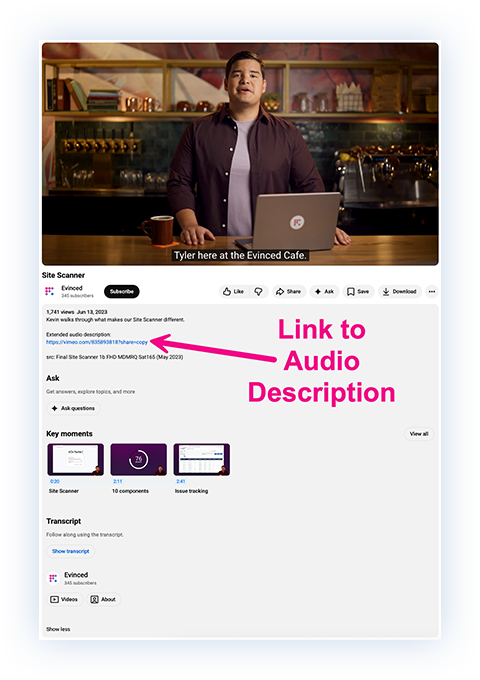
The first thing that we tried was to put a link to the audio description version of the video inside the description box of the video, like so:

This seems like a straightforward solution, but it doesn’t work for everyone.

For starters, screen reader users can’t find that description box easily. Even tabbing through (clicking “tab” instead of using a mouse to navigate a site) is a really cumbersome experience.

We tried it, and had to click the tab button on 21 elements on the page before getting to the description box. Two more clicks and we could open the AD link.

It was clunky and inefficient at best.

Our second thought: playlists, and two links

Since the idea of navigating from an existing video to an audio-described version of that same video is basically inaccessible, we thought a little further. 

What if we put all the audio description versions in a playlist? That way, when somebody is communicating the existence of a video or video series, they could include a link to the AD version(s). 

This requires some more work for the team uploading the videos, but it is an accessibility improvement. Though, if handled properly, the extra text takes up quite a lot of space, as in:

Watch this new accessibility series with Josh Blue (audio description here). 

Shameless plug aside, that usage of space becomes important when writing posts or captions with character limits. And, screen reader users will still need to get past the first link (without clicking on it) to know that the second version exists. It’s still not ideal.

Our solution

Due in no small part to these accessibility problems, we’ve started hosting more video on our Evinced Videos page.

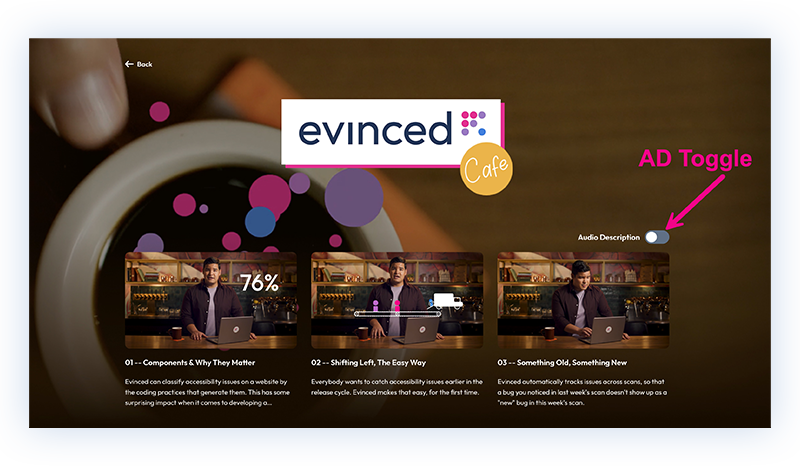
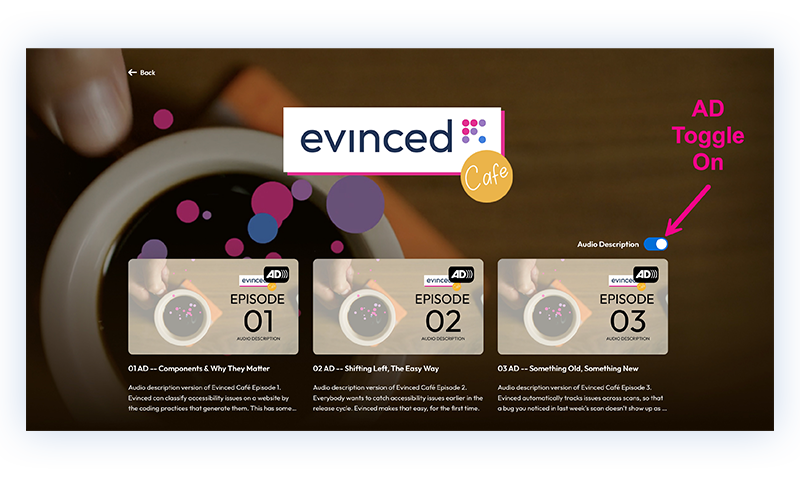
So far, our solution is to group videos into a series playlist, and then at the top of each series playlist, allow the user to toggle between the standard version and the AD version of that series. 

It looks something like this:

Image: audio description toggle set to off; standard versions of videos populate the page

Image: audio description toggle set to on; AD versions of videos populate the page

For a company making different video series, this works well. The videos are logically grouped together, and the viewer can toggle between the version of the videos that works best for them. 

It’s less efficient for standalone videos. But it has the advantage of being clearly identifiable by screen readers, and only requiring interaction once. That kind of efficiency is a key concern for screen reader users, since working through a page word-for-word just to get to where you need to go is potentially exhausting.

Screen reader users have developed a large set of techniques to work through this problem, but they only work if the page cooperates.

And we like cooperating.

What needs to happen

Given that the EAA is requiring audio description versions from here on out, we would have hoped that major video players would have evolved handling for audio description versions that is akin to what happens for captions now. 

You would simply open the player, tab to a control in a known location for checking for the presence of an audio description version, and then invoke it with the keyboard. 

Those video players have a lot of things on their video plates, but we do think they will have to move in this direction sooner or later. And when they do, we will be happy to retire our little toggle switch. But in the meantime, toggle away. 

Published on April 16, 2026 Reading time: 2 min

Josh Blue asks the questions no one else will (but probably should)

Post category: Accessibility

What happens when a world-class comedian, like Josh Blue, interviews an accessibility expert and doesn’t let him off the hook (or out of the phone booth)?

In Good Questions with Josh Blue, one of our favorite stand-up comics and self-proclaimed “Cerebral Palsy icon,” chats with (corners?) Evinced VP of Solutions Engineering, Kevin Berg, and says the quiet part out loud:

How does digital accessibility… you know… work?

Josh isn’t just here for the laughs, he’s also voicing the questions so many of us have about accessibility but might be too embarrassed to ask:

  • Who’s “in charge” of accessibility, anyway?
  • Is a web designer basically a digital Spiderman?
  • What do developers actually do?
  • And, what does the “QA” in QA Manager really stand for?

All good questions – especially in tech, where it’s very easy to give a very terrible answer.

And it’s even easier for non-technical people to feel intimidated by the complexity of digital accessibility. Josh speaks for all of us who’ve ever felt confused, curious, or just overwhelmed by the process. He peels back the layers of  jargon with humor, honesty, and a little bit of heat.

Meanwhile, Kevin explains how Evinced is helping teams wrangle that complexity – making it easier for designers, developers, QA managers, and accessibility leaders to work together and build more inclusive digital experiences.

Watch Good Questions with Josh Blue now, right here.

Published on April 9, 2026 Reading time: 4 min

Minding the gap between design and engineering

Post category: Accessibility

At the heart of every product development organization is the partnership between designers and engineers. This relationship is in many ways where the rubber meets the road, especially when it comes to accessibility. If this relationship works, designers hand off “intent,” developers understand well what needs to be done, and mistakes are avoided. But if it doesn’t – if these two worlds remain siloed – then the entire organization will be left to pick up the pieces sometime later in the development process.

Recently, we’ve come across two companies that have developed different strategies for preventing this divide, and using Evinced to do it.

Strategy 1: The designer as the accessible component architect

A major travel brand recognized that for a design system to be truly scalable, individual components – the often re-used pieces of a website that allow interactions and proper rendering – must be born accessible. They implemented an accessibility-first process in Figma, transforming the design phase. 

For many teams, getting components completely right means a certain amount of suffering, with many high-friction round-trips between the accessibility and engineering teams . If there is an accessibility team in house, that team is often strapped and reviews can take weeks or months. If there isn’t an accessibility team in house, designers are left to fend for themselves with off-the-shelf tools that all too often are not sophisticated enough to truly handle accessibility issues. 

Utilizing Evinced’s Design Assistant, however, our travel customer was able to change component design from a solely visual exercise into a complete technical handoff. Now, their designers:

  • Define component-level interaction. Every component must have documented states (such as focus, error, loading, and disabled) before leaving the design phase.
  • Establish the knowledge handoff. A common friction point is that engineers are often expected to know more about accessible engineering than they actually do. For example, without Design Assistant, an engineer might need to figure out for a given component all the ways in which it needs to behave to be accessible. But Evinced comes with pattern intelligence – that is, it already has Web Accessibility Initiative ARIA APG recommendations built in. Once the designer identifies the component type (as say, a “Modal” or “Combobox”), the knowledge about how to engineer that pattern accessibly is written directly into the handoff for the engineer’s convenience, expediting the engineering cycle.

Strategy 2: Going beyond static accessibility scans

While the design team sets the intent, a leading financial institution focused on how that intent survives the build process. 

They discovered that relying solely on free static analysis tools like axe-core wasn’t enough to catch complex interaction bugs in their component library. 

To solve this problem, they integrated Evinced’s Unit Tester into their CI/CD pipeline. This approach allowed them to:

  • Uncover hidden problems. The customer’s internal design library relied on foundational open-source components considered accessible by axe-core, but Evinced Unit Tester identified critical accessibility failures in components that free tools missed.
  • Simulate human interaction. Unlike static scans, the Unit Tester simulates keyboard operation and transitions across different component states, ensuring that accessible designs function properly for screen readers and other assistive technologies.
  • Automated gatekeeping. By making these tests a requirement for code merges, they ensured that every update to their front-end library maintained a “baked-in” standard of accessibility. We like to call that #EvincedClear.

Strategy 3: Combining Strategies 1 and 2

Taken individually, either of these strategies can be a dramatic improvement. But combining them presents a whole other set of opportunities. After all, what organizations are shooting for on design-engineering handoffs is, as in the world of security, a unified chain of trust.

Consider what the travel brand, our Strategy 1 user, might gain from adding Unit Tester. Currently, they have handoffs that serve as perfect accessibility blueprints, but no automated way to prove that the code as executed in the build matches the original design intent. Adding Strategy 2 would provide them with in effect a continuous audit that prevents accessibility regressions as their library grows.

And our financial institution, on the other hand, would gain by adding Design Assistant. Currently, their engineers are catching bugs in the Unit Tester, but they are often forced to make determinations about how each component fits into the APG nomenclature. Adding Strategy 1 would give their engineers a clear roadmap, telling them exactly what the component is and how it should behave – eliminating the guesswork and reducing dev cycles.

Putting all of this together means teams can bridge the gap between design and engineering. In a perfect world, design system components can themselves carry all the accessibility intelligence needed to maximize inclusion. From the first pixel, to the final pull request.

Published on March 3, 2026 Reading time: 8 min

Zoox, accessibility, and the curb

Post category: Accessibility
Zoox, accessibility, and the curb

Since 1945 with the invitation of curb cuts in Kalamazoo, Michigan, accessibility advocates and urban planners have struggled to get the balance right for how to make a truly inclusive transportation system.

The latest impact has been from the development of ridesharing services and, even more recently, autonomous vehicles from companies like Waymo and Zoox. 

For many riders, these developments are a technological novelty and a real convenience. But for some people with disabilities (especially those who are blind or have low vision), what’s at stake is independence itself.

The trouble with rideshares

Modern rideshare platforms like Uber and Lyft promised frictionless transportation and have their accessibility improvements to be sure. Wheelchair users, for example, can order a Wheelchair Accessible Vehicle from Uber and that can be effective. But for riders who are blind and travel with guide dogs, a typical rideshare service has its drawbacks.

Lucy Greco knows this conversation well.

An accessibility expert based in the San Francisco Bay Area, Lucy is blind and travels with a guide dog. Like many disabled riders, she relies on rideshare services to move through the city independently. Federal law is clear: drivers cannot refuse service to riders with guide dogs. In practice, however, refusals still happen. Sometimes subtly, sometimes openly.

In Lucy’s experience, drivers have refused rides altogether after arriving and seeing her service dog. Worse still, Lucy recalled one instance when she and a friend had already settled into a rideshare vehicle before the driver pulled over moments later and forced them out because of her guide dog. 

Autonomous vehicles as a solution

These problems are simply eliminated with self-driving car services like Waymo and Zoox. “Autonomous vehicles remove the biggest challenge I face with ridesharing apps,” Lucy said. “There is no human element that can look at me and my guide dog and deny us the ride. The robot doesn’t care, and it will get me where I need to go without a fight.”

For the first time, access does not depend on convincing another person to follow the rules. This is not a small thing, bringing at least one blind rider to tears of joy. With autonomous vehicles, the car arrives, the ride happens, and the negotiation disappears.

Independence born from inclusivity

In the San Francisco Bay Area, where Waymo operates fully driverless rides, requesting a car feels less futuristic and more “normal” by the day. Riders tap an app, wait for a few minutes, and – ding! – a notification comes that the vehicle has arrived. But the experience quickly diverges from a traditional rideshare. There is no driver scanning the curb, no moment of eye contact, no hesitation about a guide dog climbing into the back seat. The car simply arrives, ready for its passenger.

One of the most meaningful differences happens before the ride even begins. When a Waymo vehicle pulls up, the car emits an audible signal that riders who are blind can follow toward the door. No more searching for the car, and no need to ask strangers for help.

That detail, easy to overlook unless you need it, exists because accessibility leaders helped shape it. A patent behind Waymo’s vehicle-location system describes using external speakers to generate directional audio cues that guide passengers toward an autonomous vehicle during pickup. The feature was co-developed by Kiran Kaja, an accessibility leader and principal product manager at Amazon (incidentally, an Evinced customer).

A Zoox accessibility review

The quest for autonomy in autonomous vehicles was what brought Lucy and me to Las Vegas, where Zoox is offering free test rides at select locations before launching in more metro areas. 

Zoox, a startup acquired by Amazon in 2020, is still in early days and has hardly advertised its service as accessible. But we thought an early look, and comparison with Waymo, would be interesting.

Zoox autonomous vehicle

Image: A Zoox autonomous vehicle designed without a steering wheel or driver’s seat, parked at Area 15 in Las Vegas. [Photo: Evinced]

Unlike Waymo, which adapted existing vehicles into autonomous fleets, Zoox is attempting something more radical: a vehicle designed entirely around autonomy from the ground up. There is no steering wheel, no driver’s seat, and no obvious front or back. Inside, four passengers sit facing one another in a symmetrical cabin meant to feel less like a car and more like a living room.

On paper, the design suggests lots of accessibility potential. Wide sliding doors open fully on both sides, like a van. The spacious interior appears large enough to accommodate service animals or mobility aids comfortably. Zoox describes their vehicles not as a car, but as a “robotaxi” designed around the rider. But, which riders?

The vehicle wasn’t lacking ambition. With no steering wheel or true front or back, it never needs to reverse or back out of a corner. It simply took off in the direction it needed to go based on the route we requested.

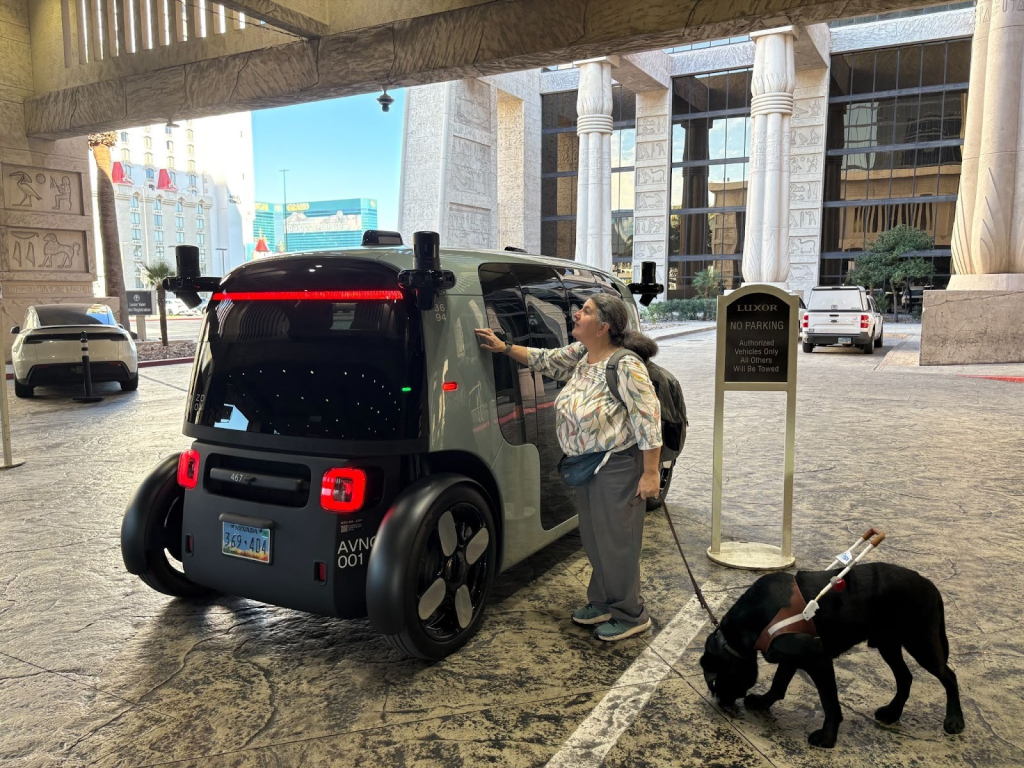
Image: Lucy Greco feels for a door on the Zoox robotaxi with her right hand while holding her service dog’s leash with her left hand. [Photo: Evinced]

But there were some definite accessibility problems still needing to be worked through. Where Waymo guides riders through sound, the Zoox vehicle relied heavily on sight. After entering the cabin, Lucy paused, waiting for cues that never came. There was no auditory prompt indicating where to sit, no spoken instruction explaining how to begin the ride. A total of four tablets, each mounted next to a seat inside the cabin, controlled the experience, including a large illuminated button used to start the trip. But there was no obvious way for a blind rider to locate it.

Even entering the vehicle introduced uncertainty. Though Zoox describes the cabin as curb-level, the car often stopped several feet away from the sidewalk. Without a grab bar or tactile cue, stepping into the cabin required guesswork, a minor inconvenience for sighted riders, but a meaningful obstacle for someone navigating without visual reference.

Inside, the only Braille labeling appeared on the emergency call button mounted overhead. When Lucy attempted to read it, the light pressure of her fingers accidentally triggered a call to emergency support. We quickly explained what had happened and were asked not to activate the button again unless there was an emergency. Whoops!

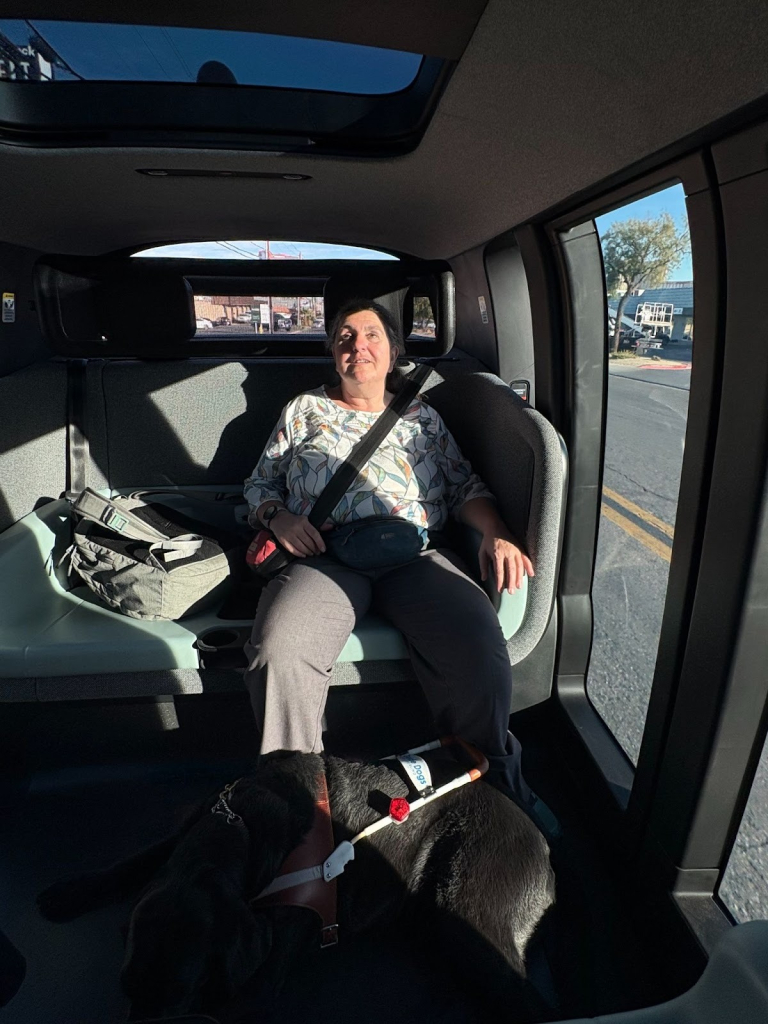
Image: Lucy Greco and her service dog ride in a Zoox robotaxi in Las Vegas. [Photo: Evinced]

For Lucy, the contrast with Waymo was obvious. While rides in both types of vehicles were comfortable, one system quietly anticipated her needs and the other required interpretation and some assistance. By the end of the day, the Zoox technology felt impressive, but independence felt uneven. That said, none of the product design issues we encountered seemed insurmountable and we hope that accessibility is high on the list for Zoox as it evolves.

Systemic challenges remain

Autonomous vehicles also face accessibility challenges from systemic issues, too.

In December 2025, a power outage in San Francisco disabled traffic signals across multiple neighborhoods. Waymo temporarily suspended its service as videos circulated online showing autonomous vehicles stopped in roadways with hazard lights flashing, stuck in conditions they could no longer interpret. The vehicles behaved cautiously, stopping rather than improvising in an uncertain environment, and no injuries were reported.

But the moment exposed a different kind of vulnerability, pointed out by advocate Erik Knaresboro from Streets of Equality. Erik expressed deep concern about safety for riders with disabilities in general but especially during situations like system outages. If a vehicle becomes immobilized during a crisis – a storm, an accident, a computer glitch – how will an unsighted rider interpret the changed environment? How do they know whether it is safe to exit, where traffic is moving, or what hazards might be nearby? 

The outage didn’t prove that robotaxis are unsafe, but it did highlight something accessibility advocates have long understood: independence doesn’t just depend on how systems act when they work. It also depends on how they act when they fail.

Inclusion before ideation

Autonomous vehicles promise greater independence for many riders with disabilities. But independence has never come from technology alone. 

The curb cut reshaped cities because disabled people helped design it, insisting that access be built into the world rather than added afterward. Inclusion works best when it happens early.

As Lucy told me during a Zoox ride, “You start with inclusion before ideation.”

In accessibility work, that principle is often described as shifting left: considering access at the beginning, not retrofitting it later.

Driverless cars are already navigating streets across the Bay Area and beyond. As autonomous transportation expands, the question is no longer whether the technology works, but who it works for and who is invited to help shape it.

If providers don’t do the work of inclusion early in their design and development process, autonomous vehicles may deliver futuristic rides for some, while leaving others still waiting at the curb.

Published on January 19, 2026 Reading time: 4 min

What an automation company learned from manual audits

Post category: Accessibility
What an automation company learned from manual audits

The question every organization asks when evaluating accessibility tools seems simple: if we choose this particular solution, how much manual testing will we still have to do?

This has been difficult to answer industry-wide for a few reasons, not least of which because many players in the industry (including us) maintain anti-benchmarking clauses in their terms of service. But it’s also true that there have been few third-party data sets for analysis.

Looking at audits

To address this gap, we decided to ask friends in the industry to send us a copy of an audit that was recently done for one of their websites. We have assumed that these audits were performed entirely manually, but even if some tools were used, the point is that they were performed on a production website, at the highest standards in the business for audits.

How do we know? Because to date, we’ve collected 35 of these audits, and virtually all were done by the two most reputable leaders in the auditing business. Here are some basics of the data set as of December 2025:

Descriptive statistics for the audit set

n35
Avg. number of issues reported178.6
Avg. number of critical issues43.5
Avg. number of serious issues105.4

Now that they’re in hand, we’re able to run some helpful analysis on them.

Because each issue reported in an audit is listed and described, we can assess whether that issue would have been automatically detectable by our tools. All of our ability to detect problems comes from a code base of checkpoints that we’ve developed called our validation set. And because our very large validation set includes the much smaller set of axe-core validations, we can also assess which of these issues would also have been detectable by a tool running axe-core. (Because we include axe-core validations, it isn’t theoretically possible for a tool solely running axe-core to detect issues that we don’t.)

So we can “backcast,” if you will, the performance of Evinced vs. axe-core over the range of the issues reported in the manual audits we have gathered to date.1

What we found

Across the audits gathered, we found that Evinced can detect nearly 63% of the issues reported, whereas axe-core detected roughly 23%.

Percentage of accessibility issues detectable in our sample of manual audits

Tool% Detected
Axe-core only22.6%
Evinced62.8%

That’s nearly three times more coverage than axe-core alone, on actual production websites. This is in line with our prior work comparing our coverage, but the data set here is particularly simple and easy to understand.

But the raw percentages, while clear, aren’t the most important learning. What truly matters is what those numbers mean for your program workload, and for its costs.

What this means for accessibility programs

Audits, even manually performed audits, have their place. They are an important part of understanding the accessibility of a production website.

But our analysis suggests something important.

The opportunity for optimizing a manual audit process is substantial. This data raises the question: if you can detect a problem automatically, why wouldn’t you do it?

To us, if an accessibility issue can be detected earlier in the development process, it should be. Automated tooling can run at a developer’s or designer’s desk, in context, without slowing delivery or requiring specialized accessibility expertise. When those issues are caught early, they never need to appear in an audit report at all.

That shift matters because every issue found late represents work that had to wait: triage, reproduction, scheduling, and remediation long after the original developer’s context has faded. By contrast, audits are for spot checking the automation, and most importantly for deploying human talent for coping with the new: new designs, new approaches, new components, new products.

In addition, it also frees human accessibility experts to focus on the critical and frankly much needed work on driving adoption.

This opportunity, while substantial, can also be stated in the negative: if you are spending tons of resources on using humans to do things automation could do, by the laws of economics, you’re robbing your organization of resources spent on things like driving adoption.

There is no free lunch in accessibility.

Our next blog post will tackle just how expensive this lunch really is. Stay tuned!


  1. Axe-core licensing agreement (held by the Mozilla Public License Version 2.0) ↩︎

Published on November 26, 2025 Reading time: 3 min

Why engineering headcount matters

Post category: Accessibility

If you’ve noticed Evinced has an unusually large engineering team, you’re not alone. That’s by design.

From day one, we understood that if we wanted to approach accessibility the way it needed to be done, we would have to invest heavily in engineering. So we built our business, including our fundraising strategy, around that vision.

We’ve grown this team, this way, for two key reasons:

1. Innovation

When we launched Evinced in 2021, the accessibility landscape was nowhere near where it needed to be. The market was dominated by service-centric businesses and a handful of tools that, frankly, weren’t good enough.

As old hands at product development, our early team knew that companies would never achieve accessibility without at least some automation. A company that ships once a month and has an unlimited labor budget might scrape by with an entirely manual program. But for organizations deploying hundreds or thousands of times a week? For that you’re going to need something more. 

As Amazon’s JoAnna Hansen likes to say, “People don’t scale, tools do.” What that means, to us, is that companies with complex websites and mobile apps need tooling to be accessible without slowing down.

So we invested. With every funding milestone, we expanded our exceptionally talented engineering team. Four years later, we offer a product suite of nine breakthrough tools, including unique capabilities like recognizing interactable elements even when they’re not properly defined in a page’s HTML.

2. Customization

As important as great tools are, we also knew early on that customers would need deep, ongoing customization.

Every customer’s environment is unique, and many needs simply can’t be predicted. Rather than keeping our customers waiting for months or years when they have requests (we’ve heard some vendor horror stories on this) we proactively planned for high-touch support by ensuring our engineering team was sized so we could frequently partner with customers.

Roughly half of our engineering organization focuses on customer-driven customization. When a customer needs a new report format, a custom integration, or a workflow-specific feature, our team can move quickly. It’s common for us to deliver customizations in weeks, not months or years.

By the Numbers

As of August 2025 we had 103 engineers who are doing nothing but working on accessibility tooling. As far as we can tell, that is dramatically more than any of our competitors. 

This all adds up to a development organization that can do it all: develop industry-leading tools, keep up with maintenance, and be responsive to customization requests from customers.

We think this is a unique approach in the space and our customers certainly tell us so. In the end, a deep bench of talented engineers is what’s needed to take customers where they want to go.

Published on September 24, 2025 Reading time: 4 min

The eight hallmarks of a successful accessibility program

Post category: Accessibility
The 8 hallmarks of a successful accessibility program

Here at Evinced, we are often asked how to build a successful digital accessibility program. 

While every company has a different path to success, we thought it might help to offer a clear, yet flexible, vision of what a strong accessibility program looks like.

Think of this blog post like a sketch: sharp enough to give you structure and direction, but open enough to adapt to your company’s size, culture, and current process.

From this perspective, what does a good accessibility program actually look like? 

For starters, it isn’t built to react to problems; it’s designed to prevent them. The end goal for an accessibility manager isn’t to find bugs and get them fixed, it’s to help their teams build accessible websites and mobile applications from the very start.

Eight hallmarks of a great accessibility program

Let’s look at the hallmarks of a program that really works.

1. Easy to adopt

No arcane tools or lengthy specialized training – your program needs to be as frictionless as possible. Just like the best camera is the one in your pocket, the best accessibility tools are the ones your team can and will actually use.

2. Budget-friendly

To get implemented, your program needs to fit your existing budget now. Your organization could opt to increase the investment once your program is showing progress, but you have to begin where you are.

3. Consistent and efficient

The program needs to do some accessibility good. It should help your team catch meaningful issues, ideally early on in development. It should be consistent, with tools or processes that catch bugs regardless of who runs them. And, it can’t add noise like false positives or unclear errors that make developers lose trust in the tools and, ultimately, want to stop following the program you’ve designed.

4. Timely

Simply put: it can’t gum up the release cycle. A good program fits into your existing release cycle, and doesn’t slow it down. The surest way to shoot an accessibility program in the foot is to make a whole engineering team wait – and wait – for your manual review or bombard them with too many bugs at once. Be thoughtful about how you report issues and make sure there’s a manageable flow.

5. Measurable

Your progress matters, not just for end-user experience, which is critical, but also for internal adoption and executive buy-in. The program you build should be set up so you can leverage your progress to make a solid case for more resources and to evangelize accessibility across your organization, as one of our customers noted here.

6. Smart

Your program should generate an action plan that respects engineering resources and gets the most bang for the buck, i.e., the most results per engineering hour. We often suggest that organizations focus on critical issues first. They’ll have the biggest impact when fixed, they have the most aggravation for end users, and they have the highest legal risk for the company. Plus, critical issues can often be traced to a relatively small number of inaccessible coding or design practices. Prioritizing and resolving those will provide quick wins for your team.

7. Collaborative

Everyone in your organization should have a clear understanding of how they contribute to this effort. Establish who owns accessibility at each stage of the product life cycle across design, development, QA, and leadership. Remember, accessibility is everyone’s job!

8. Communicated

Decide how feedback is tracked and implemented, and how accessibility performance gets reported. Momentum should be built by leveraging initial successes. Inside an organization, making meaningful improvements is infectious (in a good way).

The key to keep in mind is that you’re building an engine that keeps accessibility from becoming a one-time audit and instead evolves into a living part of your organization’s product culture. 

A well-managed program runs smoothly, doesn’t slow your development process, and builds credibility over time. It turns accessibility from a checklist into a business asset, from an obligation to a strength. 

Now that we’ve completed this vision exercise, we’ll turn to a specific plan. Stay tuned!

Published on July 14, 2025 Reading time: 5 min

The other kind of disability

Post category: Accessibility
hidden disabilities are the other kind of disabilities that don't often get talked about. This image has an icon of an eye with a line through it.

Most of what we work on here at Evinced is to help companies ready their websites and mobile apps for people using assistive technologies like screen readers, keyboards, and voice control software. 

Putting aside the fact that a computer is fundamentally an “assistive technology” in the first place, the thing to notice is that most of these users are often easy to identify at a glance. Folks who are blind, for example, are at least for sighted people, easy to identify across a room or a conference floor. They’re usually the ones with the sweet dogs!

But not all disabilities are visible in this way.

There are many, but dyslexia, ADHD, Cerebral Palsy (“CP”),  and low vision all have very real accessibility implications, both in the digital world and in the physical world. And we’ve had some experiences recently that floored us, and we thought we’d share them here.

Disabled enough?

The mother of one of our Evinced teammates has spastic cerebral palsy. Our teammate told us about the many exchanges her mom has had with people illegally parked in accessible parking spots.

Often marked with a blue wheelchair icon, accessible parking spots became prominent in the early 1990s with the passage of the Americans with Disabilities Act.

But the law didn’t (and still doesn’t) always stop people from parking illegally in those spots. 

The mother didn’t let it go then, and she doesn’t let it go now.

Back in the ‘90s, she would plant a hand firmly on our teammate’s shoulder for balance and support, and approach, saying with a sunny smile, “Hello, I think you forgot to hang your blue parking placard.”

Sometimes the driver had forgotten to display their placard and the mom’s nudge was a helpful reminder. 

But far more frequently, the car was parked illegally, and instead of doing the right thing, the driver brushed her off, often saying something breezy, like “Oh, I’ll just be a minute” or “I’m just running in quickly.” 

This was not the answer the mom was looking for. She’d typically respond, “I’d love to be able to run in, but my legs won’t let me, which is why I get to park here and you don’t.” 

For all the times it happened – and there were many – our teammate doesn’t remember any of the drivers actually moving. Usually, they would say something dismissive, such as “You look fine to me” or “You walked over here, didn’t you?”

CP is not always a predictable disability. Some people will need  mobility aids all the time, and some will only need them some of the time. We get that people are in a hurry and parking lots are often very aggravating places.  But we’d hope that people would realize that if someone else is displaying a disabled parking placard, that’s all the proof you need to do the right thing.

Not hidden – but invisible all the same

Sometimes, the effects of a disability are visible, in the way we have outlined, but they aren’t comprehensible, which can amount to the same thing.  And that leads to misunderstandings, at best.

We were talking to a performing artist recently who recalled that a hotel manager refused to allow the artist to check into the hotel, even though the artist had a perfectly valid reservation.

The reason? Because the hotel manager thought the artist was drunk. 

Except he wasn’t. Our performer friend also has spastic cerebral palsy. While he walks unassisted – there’s no cane or walker to signal that he has a disability – our friend’s movements and gait pattern can be jerky, and sometimes it can take him a little time to get words out clearly. 

If you know something about CP, you know how to interpret that behavior.  But we’d wager that the typical hotel manager, particularly in a small town, has never met anybody with spastic CP.

So, it’s not that his disability is “hidden,” but the hotel manager couldn’t or wouldn’t see beyond their idea of an acceptable or correct way to walk. Instead, they read our friend’s motions as drunk and disorderly. They thought the artist was drunk, or dangerous, or both, and simply wouldn’t listen when the artist tried to explain.

This is a professional we’re talking about, here. An artist who tours the globe and does over 200 shows a year. Hotels are his second home.  But a second home that sometimes kicks you out.

Could disability awareness have rendered the entire exchange moot? We like to think so. 

Even if it’s not feasible to know every trait of every disability, we can always rely on curiosity and empathy. The entire mess could have been avoided if the hotel manager checked their prejudice and did maybe the most important human thing there is: listen.

Not uncommon

Stories about the lack of awareness around disabilities are more common than many of us would like to think.

  • Companies are requiring staff to return to the office, even though disabled employees thrive more when working from home.
  • Sports and entertainment venues are set up to support people with visible disabilities, but fall short of accommodating people with hidden disabilities.
  • Parking lot attendants don’t know the state laws about accessible parking and end up harassing wheelchair users.

At Evinced we are working on one small end of these problems, but it’s not enough. These stories remind us how critical it is to seek out advice, expertise, and knowledge from people with disabilities. And also to practice some common courtesy, even if it isn’t always common.