

Published on November 6, 2022 Reading time: 3 min

Why Chrome extension manifest v3 matters

Post category: Technology
Chrome extension manifest v3 guide

If you’re a front-end developer, you’re probably already aware of the changes coming up to Google Chrome extensions. But even if you’re not, the changes are important and worth knowing a bit more about. 

About Chrome extensions

There are well over 100,000 Chrome extensions – pieces of HTML, CSS, and JavaScript written by third parties and installed by a user to customize their Chrome browsing experience.

There are extensions that block ads, check spelling, save passwords, offer VPN connections, and (e.g., Evinced) test a website’s accessibility. The list is nearly endless.

Extensions are built out of two main types of components:

  1. Content scripts with a user interface, or that need to access data on a web page.
  2. Background scripts which do not have access to the user interface. These have access to browser events such as opening a new tab, refreshing the page, etc. The background script often acts as the server side of the application.

Permissions and security

Chrome extensions in the past have had a surprisingly large list of permissions. For example, extensions could:

  • Access and manipulate the DOM. Grammarly, for example, uses its permissions to read the contents of input fields and check the spelling.
  • Send requests to servers.
  • Download scripts from a server and run them.
  • Run scripts on the website a user is visiting. Evinced uses this to check for accessibility issues.
  • Read and manipulate network requests. HuluVPN uses this to reroute requests to a different server in a different country.
  • Bypass CORS defenses that are enforced by the browser.
  • Listen to browser events.

This is only a partial list of course, but even a non-developer can see that this list is expansive and presents nefarious coders with lots of opportunities for mischief.  As we say in the business, the attack surface is huge.  

To take just one example, a hacker group took over an extension called The Great Suspender and modified it to download and execute malicious code from their servers, while installed on millions of devices.

Say hello to version 3!

Google, thankfully, is responding, with a very serious change to how Extensions are coded.  That change is called Manifest Version 3, and all Chrome Extensions will need to move to the new, significantly less permissive framework.  The official timeline is being re-evaluated by Google (who looks to have firmer dates by March 2023), but we’re planning on being ready sooner rather than later. As of today, that timeline looks like this:
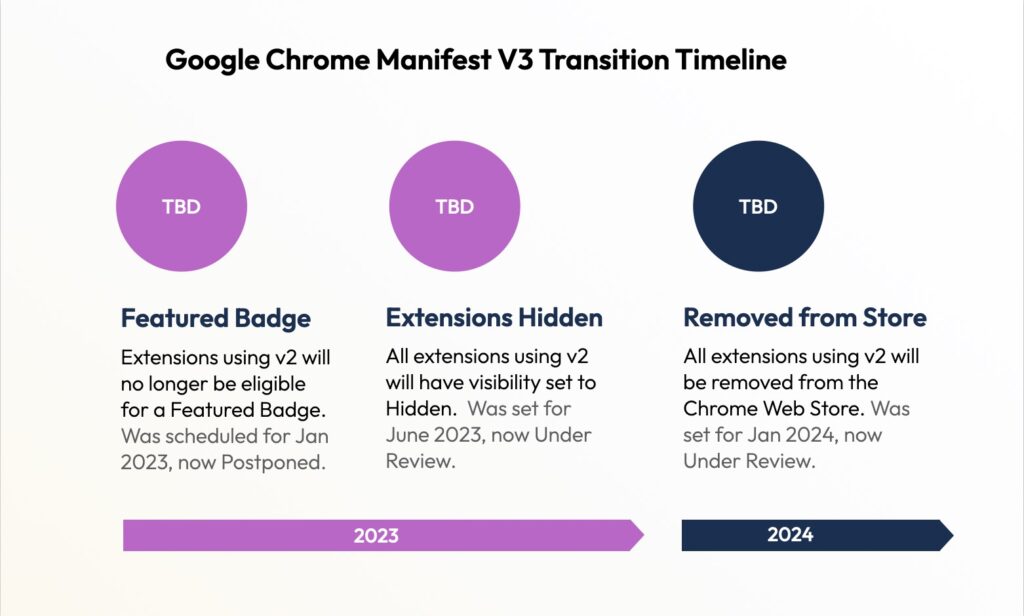
Chrome Extension Manifest v3 timeline: Featured Badge requirement will be imposed sometime in 2023.  V2 extensions will be hidden after that, sometime in 2023. And v2 extensions will be removed sometime in 2024.

The heart of the change is about security and permissions. In short:

1. Downloading and running any external source code is forbidden. This includes fonts, scripts, CSS, etc.

2. Fewer permissions and capabilities when accessing the network level.

3. Making the background work as a service worker

Because all the code will be bundled into the extension, Google will now have the entire code of an extension, with no code added at runtime. This raises the possibility that Google could detect suspicious code in advance, and remove the extension before it gets installed by users.

That’s a big win.

The future

Personally, we welcome the security improvements, even if upgrading an extension to the new protocol is less than easy (more about that soon).  We don’t believe that Manifest v3 will be perfectly secure – hackers have their ways, after all – but closing the obvious loopholes is simply the right thing to do.  That’s familiar territory for us, as we try to make the world a little more accessible every day.

Published on February 7, 2022 Reading time: 5 min

Automatic detection of invalid focus indication

Post category: Technology
Evinced uses computer vision to detect invalid focus indication

Even as a person who just likes to use the keyboard as a quick way to move through web pages and complete forms I find it extremely frustrating when you lose your place due to a focus indication ring that doesn’t grab your attention.

However, a large number of users depend on focus indicators around web and mobile elements to effectively and efficiently navigate a page, especially when using a keyboard or other assistive technology. This frustration when trying to use the primary functionality of a website often causes users to look elsewhere to complete their task or purchase. It is unfortunate that something this critical for so many users is often overlooked.

One of the reasons it is so often unnoticed is that the technology to automatically detect whether an element has an appropriate focus indicator that aligns with the WCAG success criteria hasn’t existed. Often, even when developers have the best of intentions, a focus indication ring doesn’t have the needed contrast to be useful. Another issue is that WCAG 2.1 was far too vague when it came to focus indicators. Fortunately WCAG 2.2 has updated the important criteria to ensure the indicators meet the needs of the users depending on them.

In this post we will discuss the WCAG standard for focus indicators and how Evinced has used modern technology to detect and evaluate these important indicators for adherence to the WCAG success criteria. We would also discuss the technical challenges that our team was facing while developing this feature and some of the solutions they came up with.

WCAG criteria

Unfortunately the WCAG 2.1 description is quite vague when it comes to focus indicators. It simply states:

Any keyboard operable user interface has a mode of operation where the keyboard focus indicator is visible.

This provides no guidance surrounding height, width, area, or contrast requirements to make sure all users are able to detect them. Fortunately The WCAG 2.2 draft provides a few concrete rules for visible focus indication:

  • Minimum area: The focus-indicator-area is either:
    • at least as large as the area of a 1 CSS pixel thick perimeter of the unfocused component;
    • at least as large as a 4 CSS pixels border along the shortest side of the unfocused component, and no thinner than 2 CSS pixels.
  • Change of contrast: The pixels making up the minimum focus indicator area achieve at least a 3:1 contrast ratio between their colors in the focused and unfocused states.
  • Adjacent contrast: The pixels in the minimum focus indicator area achieve at least a 3:1 against adjacent colors in the focused component or the minimum focus indicator area has a thickness of at least 2 CSS pixels.
  • Not fully obscured: The item with focus is not entirely hidden by author-created content.

Now that we have an agreed upon definition for success criteria the Evinced team set out to use modern technology to detect the criteria required for focus indicators automatically.

Using computer vision technology

To solve this problem, Evinced has employed modern technologies like computer vision among others. At a high level, we start by interacting with the elements on the page and then capture image snapshots of them with and without focus indication. For example:

Detection of invalid focus indication - an example: button with the text try it for free
A button element without focus
A button with the text try it for free. There is a dotted line focus indicator surrounding the button.
A button element with focus

Each image pair that was collected is then compared and analyzed using computer vision models. Various properties of these images such as color contrast and luminance are calculated in order to determine if they meet the WCAG success criteria.

Improving performance

As you might imagine, when working the complexities of modern websites, computer vision models, and screenshot files for a large number of elements on a page we initially noticed a large performance burden. After analysis of the code was conducted, it was clear that the most time-consuming operation of the algorithm was obtaining snapshots of the elements on the page before and after gaining focus.

After a significant amount of research and experimentation, we found that the main performance issue was due to the iteration through the interactable elements on a page, both with and without focus. As an example the Evinced website contains 42 interactable elements that would each require two snapshots. Amazon’s homepage contains hundreds! We discovered that while taking snapshots of the focused element is important to be done while interacting with the page, the snapshot of element without focus can be done beforehand. Therefore, only one snapshot of the entire page is needed and all images of elements without focus are cut from it. With our initial implementation a page with X elements required 2X snapshot operations. The improved version only needs X+1 snapshot operations and X image-cropping operations which are significantly faster.

In addition, we designed the new validation processors to be horizontally scaled so we can address large amounts of interactive elements in parallel as opposed to being processed sequentially. With these two enhancements processing was cut time by more than half!

Solution

Our solution to detect appropriate focus indication rings according to WCAG guidelines is the first step in what can be achieved when we use modern technology to solve accessibility problems. We’ve tested this feature on thousands of urls and over 95% of the automatically detected faulty focus indication rings were a violation of the WCAG criteria. Not only is it resilient and reliable, it is incredibly performant!

Evinced is excited to announce that this feature is available to all customers via the Evinced Site Scanner. Site Scanner crawls your entire website, scans every page, and reports accessibility problems. Not only that, but Site Scanner helps you make sense of the potentially thousands of issues on your website, track issues over time, and do it all faster and more securely, too.